Daily Learnings: Tue, Jun 17, 2025
The fewer rules a coach has, the fewer rules there are for players to break. — John Madden
Notes on Claude Code (and other AI Coding Assistants)
I’m starting to really take a deeper dive into using AI coding assistants. I’ve been using Cline for a while, but I’m very interested in experimenting with Anthropic's Claude Code, since I keep coming back to Claude as my preferred LLM for coding workflows.
So, with the desire to learn more, I’ve been digging deeper into YouTube, and found this great video on Mastering Claude Code.
These are my notes / thoughts while reviewing it.
General Tips
- You can run Claude Code in the embedded terminal in VS Code to have a more editor-like experience
- I think that there’s a VS Code extension now for it…?
- Yes: According to the docs here: You run
claudein the integrated terminal and the extension will auto-install
- Yes: According to the docs here: You run
- I think that there’s a VS Code extension now for it…?
- Ask Claude questions about your codebase, especially codebases that you haven’t touched in a while
- Tell Claude to propose plans, and then you’ll pick one
- Ex. “Propose a few fixes for issue #8732, then implement the one that I pick”
- Steer Claude in the right way to use the tools that it should use.
- Ex. “Identify edge cases that are not covered in
@app/tests/signupTest.ts, then update the tests to cover these. Think hard.” - Tell Claude about your MCP tools that you have running.
- Ex. “Use the barley MCP server to check for error logs in the last training run.”
- Ex. “Identify edge cases that are not covered in
- Give a way for Claude to see its results, and let it iterate, and it will get better
- Ex. Give it a tool for navigating web UI’s, or taking screenshots. Or give it a way to test things
- Tailor the workflow to the task
- More Context == better results
- Ways to share context:
CLAUDE.mdfiles (see below)- Slash commands
- At-mentioning file names
- Coming soon: MCP Resources
- Ways to share context:
- Take time to tune context, and Claude will get better
CLAUDE.mdfiles- MCP servers
- Other memory files
- Slash commands
- There is a Claude Code SDK for scripting Claude
- Used for lower-level interactions with Claude
- Still scratching the surface of all of the ways that we could use this
Built in tools
- bash
- File search
- File Read
- File write
- Web fetch
- TODO’s
- Sub-agents - This is the one that I’m really interested in
- Ex. Use 3 parallel agents to brainstorm ideas for how to clean up
@services/aggregator/feed_service.cpp
- Ex. Use 3 parallel agents to brainstorm ideas for how to clean up
Additional Tools to Consider
- Claude Code Github App - can allow for mentioning Claude in Issues and PRs
Ask Claude Code Questions about your codebase
- “Look at PR #9383, then carefully verify which app versions were impacted.”
- “Look at issue #18363. Why did we fix the code this way?”
- “What did I ship last week?”
CLAUDE.md File
- Claude will pull them in on-demand based on where it’s working
- Pulled in automatically, don’t need to prompt Claude to pull it in
- Can be located in different places project-specific
~/.claude/CLAUDE.md- Shared across all projects<project-root>/CLAUDE.md- Project-specific- Or
<project-root>/CLAUDE.local.md- Not checked into source control
- Or
<project-root>**/CLAUDE.md- Nested directory config / context
Sharing different Claude Configurations
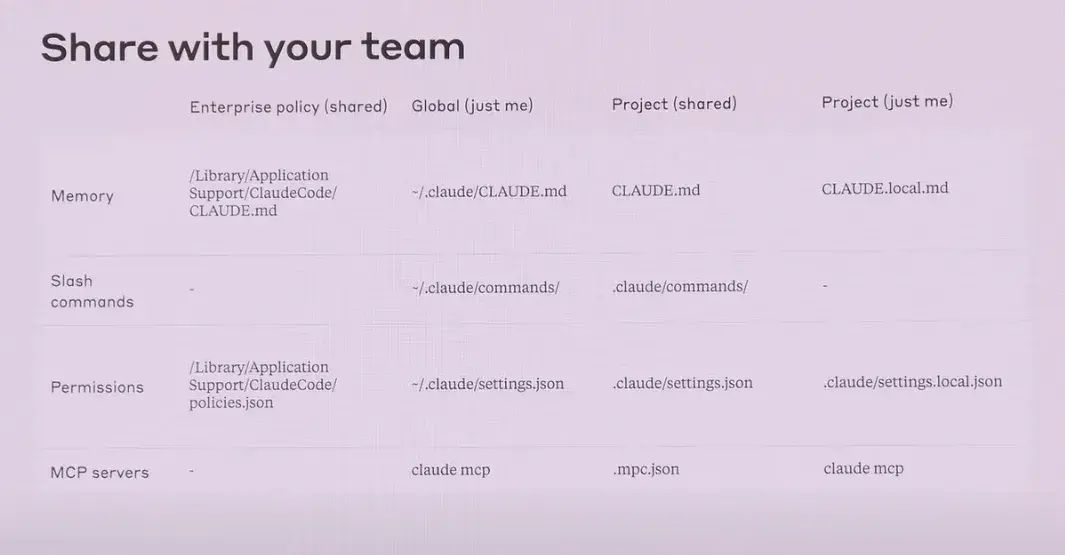
- Note: the
.mpc.jsonin a project will prompt people to install the correct MCP servers when they run Claude Code
Terminal Keybindings
SHIFT+TAB- auto accept edits#to create a memory!to drop into bash mode@to add a file or folder to contextESCto stop Claude - Safe way to stopDouble ESCto jump back in history--resumeto resume
CTRL+R- verbose mode/vibe- ???
Workflows to Test Out
- Can I write well-thought-out issues on my personal repos, like for my personal site, mention Claude in them, and have Claude prepare new branches to complete the work needed?
- This to me would be ideal. If I can centralize my plans for the codebase in Github Issues and have the agent work through them methodically, it will help me to feel more organized while working with the AI.
- Explore > Plan > Confirm > Code > Commit: “Figure out the root cause for issue #983, then propose a few fixes. Let me choose an approach before you code. ultrathink”
- Write tests > Commit > Code > Iterate > Commit: “Write tests for
@utils/markdown.tsto make sure links render properly (note the tests won’t pass yet since links aren’t yet implemented). Then commit. Then update the code to make the tests pass.” - Write code > Screenshot result > Iterate: “Implement
mock.png. Then screenshot it with Puppeteer and iterate till it looks like the mock.” - Claude in parallel
- Use multiple checkouts in separate terminal tabs
- Use one checkout with
gitworktrees ssh+tmux- Github Actions, launch jobs in parallel